
Same award-winning apps. Better experience.
Studiometry Cloud is the easiest way to use Studiometry across all of your computers and devices. Access and seamlessly sync your data on Mac, Windows, iOS, and the web.

What’s included
- ✓Cloud syncing for an individual or a team, from anywhere over the internet
- ✓Access and sync your data in our native Mac, Windows, and iOS apps
- ✓Send invoices and receive credit card payments
- ✓Integrate with 500+ apps and services (Slack, Evernote, Trello, and more) via Zapier
- ✓Web browser access for certain features
- ✓File sharing with links to your projects, clients, and forms
- ✓Zero-hassle setup — no server to manage, no firewall ports, no IP addresses
- ✓No initial investment; first month free, then pay monthly or yearly
- ✓Always the newest version of Studiometry — never pay upgrade fees
- ✓Studiometry Touch included in the monthly fee
Manage your business on…
Desktop
Use the award-winning Studiometry app on Mac or PC to access and sync your data from anywhere.
Web
Access parts of your data — to-dos, timesheets, running timers — from any web browser. New features roll out constantly.
Mobile
Your clients, projects, work, and invoices in the palm of your hand with Studiometry Touch for iPhone and iPad.
Studiometry Cloud vs. traditional licenses
| Studiometry Cloud | No Cloud (traditional licenses) | |
|---|---|---|
| Pricing | $20 per employee per month, billed annually. Or $22 month-to-month. | $249 per computer, plus an optional $69/year for upgrades. $40/year/device for Studiometry Touch. |
| License | Your license and all upgrades are included in the monthly fee. You always have the latest version. | You buy it, you own it. Licenses don’t expire, but newer versions need a paid yearly upgrade. |
| Native apps | Use the native Studiometry apps on Mac, Windows, and iOS. | Use the native Studiometry apps on Mac, Windows, and iOS. |
| Browser access | To-dos, running timers, timesheet entry, and form entry from any web browser (more added over time). | None. |
| Client access | Clients can view live data and give feedback from any browser: invoices & payments, project statuses, report/estimate/PO approval, form entry, file attachments. | None. |
| Integrations | Integrate with 500+ apps and services via Zapier. | None. |
| File sharing | Upload and share files linked to clients, projects, and forms; receive files from clients via forms. | None. |
| Syncing | Securely syncs with Studiometry Cloud servers. No setup — just log in. | Sync with your own server via its IP address. If the server is offline, you can’t sync. |
| Setup | Create an account and log in. | Set up a dedicated server computer, modify firewall ports, and enter IP addresses on every machine and device. |
| Studiometry Touch | Included in the monthly fee. | $40 / device / year. |
Send invoices, receive payments
With Studiometry 16 you can send invoices that clients view and pay directly on the Studiometry Cloud website. Payments are processed securely through Stripe.
500+ integrations with Zapier
Connect Studiometry to more than 500 apps and services — Slack, Evernote, Trello, and many more — using Zapier.
Sign me up!
- If you haven’t yet, download Studiometry.
- First time opening it? Choose Sign Up for Studiometry Cloud.
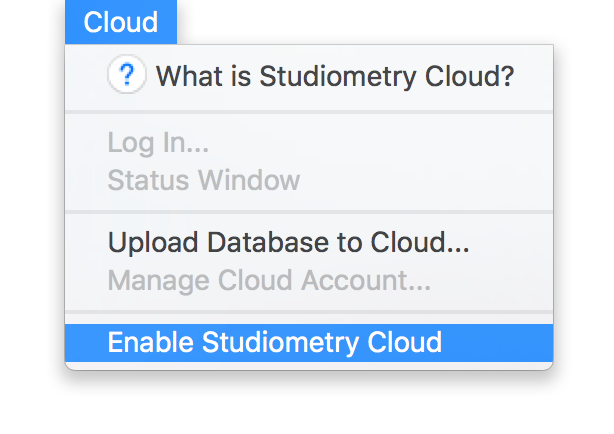
- Already installed? Choose Cloud Menu → Enable Studiometry Cloud.
You can also sign up via the web — you’ll then log in to your Cloud account inside the Studiometry app to finish.
Frequently asked questions
General
›What is Studiometry Cloud?
The easiest way to sync your Studiometry data between devices and employees. It replaces a traditional server/network setup and does the heavy lifting for you — just sign up for an account.
›Is Studiometry Cloud a web site?
It’s both a website and a syncing service for our native apps. You can manage your account and access a subset of features from a browser, but you’ll still use the Mac, Windows, and iOS apps for most of your data. Cloud syncs everything between them.
›Where can I sign up?
The best place is directly within the Studiometry app: Cloud Menu → Enable Studiometry Cloud. If Studiometry isn’t installed, download it and choose “Sign Up for Studiometry Cloud” on the welcome screen.
Syncing
›What is synced over Studiometry Cloud?
Nearly everything in Studiometry — clients, projects, contacts, debts, invoices, logs, payments, reports, resources, to-dos, stages and templates, categories and rates, invoice/report templates, groups, images, schedules, notifications, general settings, and more.
›Where is my data stored?
Securely stored and backed up on our Cloud servers. Each of your machines and devices also keeps a local copy, and you can configure local backups on any computer.
›Can I access my data without an internet connection?
Yes. Changes made offline sync to the cloud the next time you connect. Accounts can also be set to prevent offline access if desired.
Accounts & pricing
›How much does Studiometry Cloud cost?
$20 per employee per month billed annually, or $22 month-to-month. Includes unlimited machines and devices (including iOS) and all upgrades with no extra fees.
›Do I have to pay for new versions of Studiometry?
No. An active Cloud account always gives you the newest version, with no upgrade fees.
›Do I need to buy a Studiometry license to use Cloud?
No — an active Cloud account functions as your license. If it expires, you’ll need to renew or buy a traditional license to keep using Studiometry.
›I own an old version — do I need to upgrade before signing up?
No. Cloud doesn’t require any licenses or upgrades. Your old license keeps working with your old version indefinitely; a Cloud account gives you the current version of Studiometry and Studiometry Touch plus syncing.
›Do I need a separate Studiometry Touch license?
No. An active Cloud account lets you sync with Studiometry Touch on iPhone, iPad, or iPod Touch.
›I already own a traditional license — do I still pay for Cloud?
Yes. Cloud is a separate service. Your traditional license never expires. If you’d like to transition to Cloud, contact support.
›How many computers/devices can I use?
Unlimited. Each employee can be active on one machine or device at a time; logging in elsewhere temporarily logs out the old one.
›If I cancel my Cloud account, can I still use Studiometry?
Only if you own or purchase a traditional license. Studiometry requires either an active Cloud account or a valid current license.
›Why offer both subscription and non-subscription licensing?
Because we aren’t jerks. Many users are happy with traditional licensing and have their workflows set up; others want cloud syncing and a lower initial investment. We offer both so you can choose what’s best for your company.